
Every lead answered, every quote followed up.
New requests reach your app ranked by what will be lost first. Estimate and agreement reminders go on their own and stop the moment the customer answers. Customers hear when the crew is on the way and when the visit is done. You set when, and the words are written for you.
Free request. You review the scope and price before you commit, and sending it creates no account and takes no payment.
At a glance
- A clock on every lead
- The request that is going cold is on top
- Reminders
- Up to three, on days you set, stopped by the customer’s answer
- On the day
- On-the-way texts and visit-done notices
- You choose
- On or off and the days for each; we write the words
One of eleven solutions: Lead alerts and follow-up workflows
What switching it on adds.
A package is priced by the solutions it names. Switch this one on and you get the list below. Leave it off and the rest of your package keeps working.
- A clock on every lead, so the most urgent request is on top
- Up to three estimate reminders on the days you set, stopping when the customer answers
- Agreement and renewal reminders
- On-the-way texts and visit-done notices
- Each message on or off, with its days, and the words written for you
Without it
New requests still reach your office and the customer still gets an acknowledgement. The lead clock, the reminders and the on-the-way and visit-done notices are off.
You set when. We write what.
Each message has its own switch.
Lead alerts, estimate, agreement and renewal reminders, on-the-way texts and visit-done notices each have an on or off switch. The reminders have days you choose.
Owners set when, not what. The words are written for you, and each message shows an example before it goes. The on-the-way and visit-done messages start off, so switching the solution on sends no new kind of text nobody asked for.
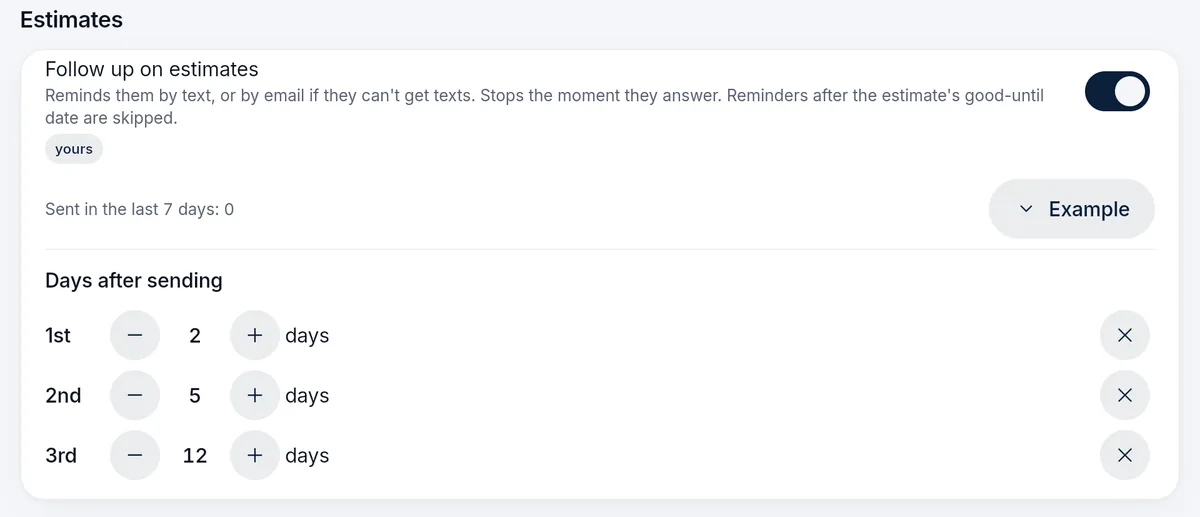
Follow-up that knows when to stop
Reminders until they decide. Then silence.
Choose up to three days after sending. The default is two, five and twelve. The reminder is a text when the customer agreed to texts and an email when they cannot be texted. Nobody who has opted out is contacted, and nothing goes after the estimate’s good-until date.
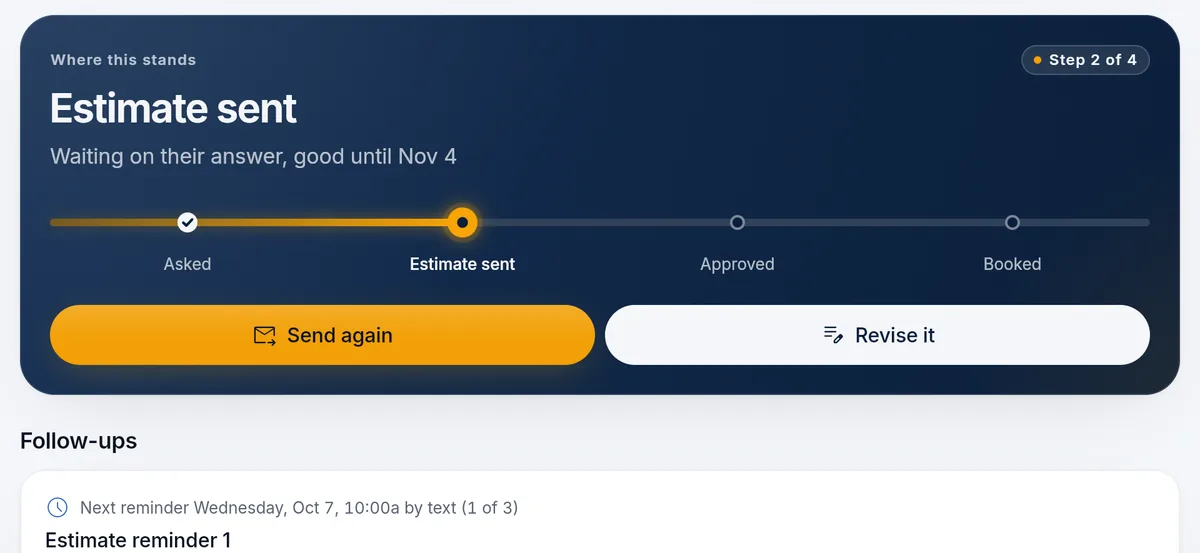
- SendThe customer gets the estimate by text or link.
- RemindReminders go out on the days you set.
- StopAn approval, a decline, a change request, expiry or a booking stops the rest.
- ReviseA new version starts its own reminders. An older stop does not cancel the newer one.
Stops the moment they answer
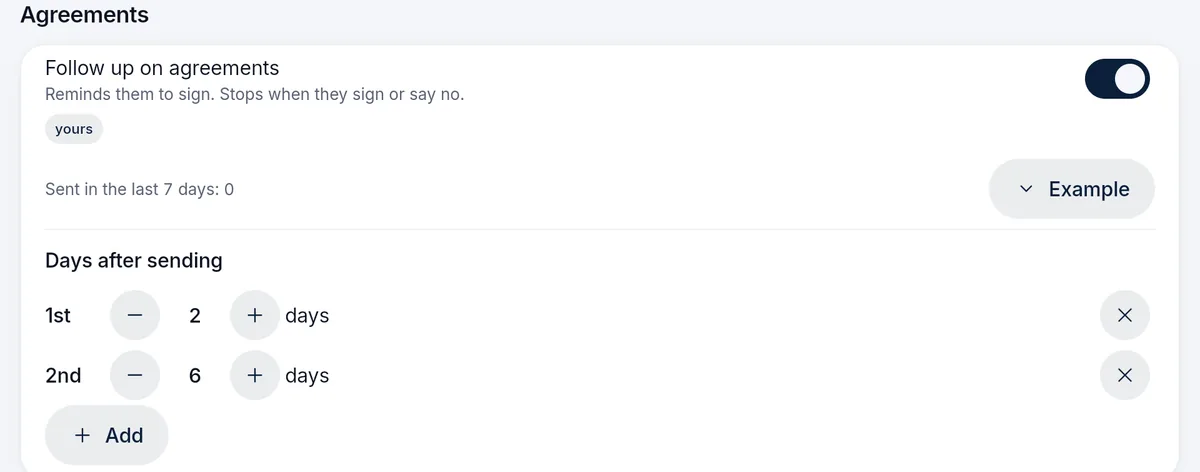
A reminder to sign. Then silence.
Agreements and next season’s renewals get the same treatment: reminders on your days, stopped by the customer’s answer. A message sends only with the customer’s consent and a registered business number or email sender.
Every message
What runs by itself, and who confirms the rest.
A fixed set of messages between your lead, estimate, visit and customer. Booking, exceptions and any commercial judgment stay with a person.
| When | What goes | What a person decides |
|---|---|---|
| New lead | Your office is alerted, and the lead is ranked by how long is left to answer it. | A person calls and records the outcome. |
| Estimate sent | Up to three reminders on the days you set, by text or email. | The customer approves, declines or asks for a change. Your team books the work. |
| Agreement sent | Reminders to sign, until they sign or say no. | Your team books the visits. Signing never charges a card. |
| Renewal sent | Reminders to renew before your offer ends. | You chose who gets the renewal and its terms. |
| Crew on the way | A text to the customer when the crew sets off for the day’s first stop, then as each stop finishes. | Off until you turn it on. |
| Visit done | A notice that the visit is finished, by notification where their app allows it, otherwise by text. | Off until you turn it on. |
Where it stops
Narrow on purpose.
Texts go only to customers who agreed to them, from a registered business number, and carrier usage is billed at cost.
What it does
- Ranks new leads by how long is left to answer them
- Sends estimate, agreement and renewal reminders you time, and stops them on an answer
- Tells customers the crew is on the way and the visit is done
- Shows each message before it goes
What stays with your team
- Calling the lead and recording the outcome
- Booking a job or accepting an exception
- Texting without consent. It never happens
- Rules you would want to invent yourself. There is no workflow builder
Before you buy
What has to be agreed first
This page describes the capability. It does not put every module, unlimited texting, ad management or a custom software project into an unnamed price. Your package names what is included, what we set up with you, and which provider or usage charges sit outside it.
Read how package scope is quotedSee what concierge setup includes
Your package names
- What is included
- The modules and support your package lists
- What we set up with you
- Agreed with you before you buy
- What sits outside
- Provider and usage charges, such as payment processing, texting and email
Questions
Questions owners ask
Short answers to what owners ask before they send a request. Anything missing goes in your request, and we reply by email.
What does the lead clock do?
Each new request shows how long is left to answer it while it is still warm, and your office’s list is ordered so the most urgent one is on top. You set how quickly a lead should be answered.
How do estimate reminders work?
Up to three reminders go out on the days you set after sending, by default days two, five and twelve. It is a text when the customer agreed to texts and an email when they cannot be texted. A reminder is checked again just before it leaves, so an estimate approved a minute earlier stays quiet.
When do reminders stop?
When the customer approves, declines or asks for a change, when the estimate expires or closes, or when the contact can no longer be messaged. A revised estimate starts reminders for the new version only.
When does the on-the-way text go?
When the crew sets off for the day, the first stop’s customer is told the crew is on the way. After that, finishing a stop tells the next customer. It needs the day’s route saved, and it starts switched off.
What do customers get without Lead alerts and follow-up?
Every request still reaches your office and the customer still gets an acknowledgement. Visit reminders the evening before come with every package. The lead clock, the reminders and the on-the-way and visit-done notices are part of this solution.
Is this a workflow builder?
No. The messages are the ones on this page, each with its own switch and days. The words are written for you and shown before anything goes.
See what your package would include.
Tell us your company, services and crews. We reply by email with scope and price.
Build my packageFree request. Nothing is charged until you agree to scope and price.